Model Guide: Kimi K2.5
By Dylan Condensa
In this model guide we explore the newly released Kimi K2.5 model from Moonshot AI, how it compares to similar models, recommended hardware, and how to deploy it yourself.
Introducing Kimi K2.5
The team at Moonshot AI have released a new flagship open-source model, Kimi K2.5, consisting of 1T total and 32B active parameters, 384 experts, and a context length of 256K tokens.
Kimi K2.5 builds on their previous flagship model, Kimi K2, which set record benchmarks for reasoning and search performance against both closed and open models.
Kimi K2.5 is a native multimodal model that has been pre-trained on an additional 15T mixed visual and text tokens to deliver state-of-the-art agent, coding and vision capabilities.
Kimi K2.5 Performance & Capabilities
Kimi K2.5 performs exceptionally well across agent, coding, and vision understanding benchmarks, often matching or outperforming its closed source counterparts—GPT 5.2, Gemini 3 Pro and Claude 4.5 Opus.
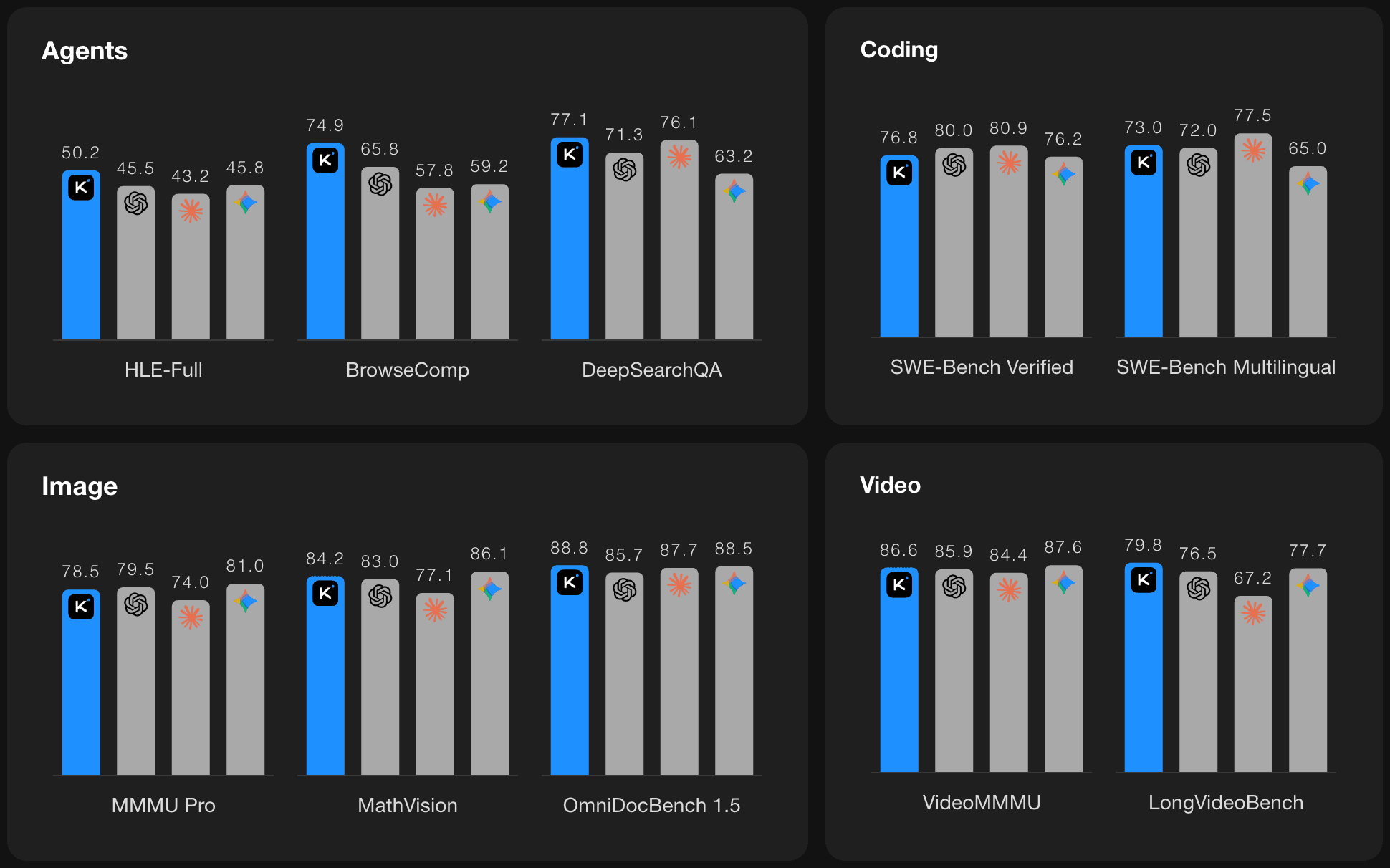
Although Kimi K2.5 still trails most closed-source models on some pure coding benchmarks, it leads all other open-source models, making it the strongest open coding model currently available.
According to Moonshot AI, Kimi K2.5 is particularly strong in front-end development. The model can generate complete interactive interfaces from a single prompt, including rich animations such as scroll-trigger effects.
Beyond text prompts, Kimi K2.5 excels at coding with visual inputs. By reasoning directly over images and video, the model enables image- and video-to-code generation as well as visual debugging workflows. This allows users to express intent visually and enables the model to inspect and iteratively refine its own outputs.
Kimi K2.5 has also been designed for large-scale professional knowledge work. Through its Agent mode, the model can coordinate multi-step workflows to generate documents, spreadsheets, PDFs, and slide decks directly from conversation.
Kimi K2.5 supports long-form outputs such as 10,000-word papers and 100-page documents, as well as advanced operations like constructing Pivot Tables, writing LaTeX equations in PDFs, and generating structured reports across multiple file formats.
Deploying Kimi K2.5 - Recommended Hardware
Kimi K2.5 is available on Hugging Face in native INT4 quantization. In this format, the model weights require approximately 630 GB of GPU memory.
Additional memory is required for KV cache, multimodal encoders, and concurrent requests.
For production deployments targeting the full 256K context window with practical concurrency, we recommend deploying Kimi K2.5 on an 8-GPU node of either H200, B200, or B300 GPUs.
Deploying Kimi K2.5 - vLLM Quickstart
To deploy Kimi K2.5, we recommend using the popular inference framework vLLM.
To set up a vLLM server with Kimi K2.5, you can use our Kimi K2.5 vLLM template, or follow the steps below.
Step 1: Set up your environment and install dependencies
# Clean Python3 installation
sudo apt install python3-venv

# Set up virtual environment
python3 -m venv .venv
source .venv/bin/activate

# Install vLLM nightly build
pip install -U vllm --pre \
    --extra-index-url https://wheels.vllm.ai/nightly/cu129 \
    --extra-index-url https://download.pytorch.org/whl/cu129
Step 2: Start vLLM server
From our testing, Kimi K2.5 generally takes ~30 minutes to load.
vllm serve moonshotai/Kimi-K2.5 -tp 8 \
    --host 0.0.0.0 --port 8000 \
    --mm-encoder-tp-mode data \
    --tool-call-parser kimi_k2 \
    --reasoning-parser kimi_k2 \
    --max-model-len 262144 \
    --trust-remote-code
Step 3a: Query the server (Standard Text)
Make sure to replace <instance-ip> with the ip address of your GPU instance.
curl -X POST "http://<instance-ip>:8000/v1/chat/completions" \
     -H "Content-Type: application/json" \
     -d '{
         "model": "moonshotai/Kimi-K2.5",
         "messages": [
             {"role": "user", "content": "Your prompt here."}
         ],
         "temperature": 1.0,
         "max_tokens": 512
     }'
Step 3b: Query the server (Image + Text)
Make sure to replace <instance-ip> with the ip address of your GPU instance.
Image URLs must be publicly accessible or provided as base64-encoded data.
curl -X POST "http://<instance-ip>:8000/v1/chat/completions" \
  -H "Content-Type: application/json" \
  -d '{
    "model": "moonshotai/Kimi-K2.5",
    "messages": [
      {
        "role": "user",
        "content": [
          {"type": "text", "text": "Your prompt here."},
          {
            "type": "image_url",
            "image_url": {
              "url": "https://example.com/image.png"
            }
          }
        ]
      }
    ],
    "temperature": 1.0,
    "max_tokens": 1024
  }'
Step 3c: Query the server (Video + Text)
Make sure to replace <instance-ip> with the ip address of your GPU instance.
Video URLs must be publicly accessible or provided as base64-encoded data.
Video input typically requires ffmpeg for decoding and frame extraction and may not be supported in all vLLM deployments by default.
curl -X POST "http://<instance-ip>:8000/v1/chat/completions" \
  -H "Content-Type: application/json" \
  -d '{
    "model": "moonshotai/Kimi-K2.5",
    "messages": [
      {
        "role": "user",
        "content": [
          {"type": "text", "text": "Your prompt here."},
          {
            "type": "video_url",
            "video_url": {
              "url": "https://example.com/video.mp4"
            }
          }
        ]
      }
    ],
    "temperature": 1.0,
    "max_tokens": 1024
  }'
Recap
Kimi K2.5 demonstrates strong performance across agentic reasoning, multimodal coding, and vision understanding benchmarks, establishing itself as the leading open-source model for coding with particularly strong capabilities in front-end development.
Its native multimodal training enables workflows that combine text, images, and video, including visual debugging and image- and video-to-code generation, extending its usefulness beyond traditional text-based coding tasks.
With support for a 256K token context window, Kimi K2.5 is well suited for long-form reasoning, large codebases, and document-centric applications such as report generation and spreadsheet analysis, and structured professional content creation.
Teams deploying Kimi K2.5 in production should plan for substantial GPU memory requirements. For workloads targeting the full 256K context window with practical concurrency, we recommend deploying on an 8-GPU node of H200, B200, or B300 GPUs.
Deploy Kimi K2.5 Today
Kimi K2.5 represents the most advanced open-source model currently available for multimodal coding and long-context workloads.
To get started, deploy our Kimi K2.5 vLLM template on Shadeform and begin testing today.